Breeze agent tools · Early access

Let your HubSpot agents answer from HubDB

HubDB Lookup gives Breeze agents two tools: one finds the right table, the other searches it. Products, prices, store hours, events, team members, property listings: if it's in HubDB, your agents can look it up. No setup per table.

FreeDuring early access · We help you set it up

  • Read-only HubDB access
  • Works with any HubDB table
  • Agents and workflows
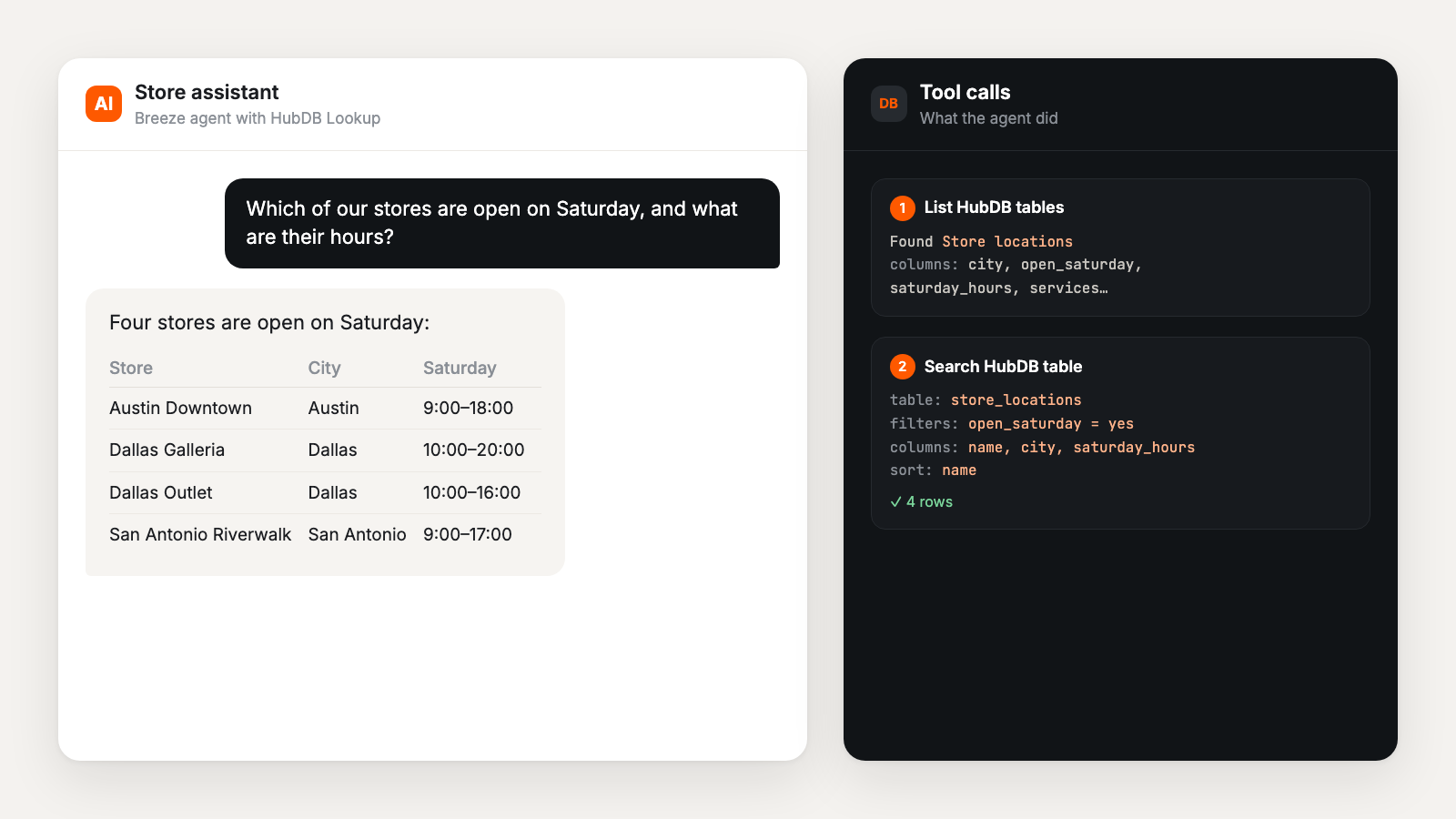
A Breeze agent answers which stores are open on Saturday by listing HubDB tables and searching the store locations table

Why HubDB Lookup

Your HubDB data, now in every agent answer.

  • Any table, no mapping

    The agent sees your published tables, their columns and select options, and picks the right one on its own.

  • Real filters, not guesses

    Equals, greater than, contains, any of, is empty. Agents filter, sort and limit, so answers come from your rows.

  • Across tables

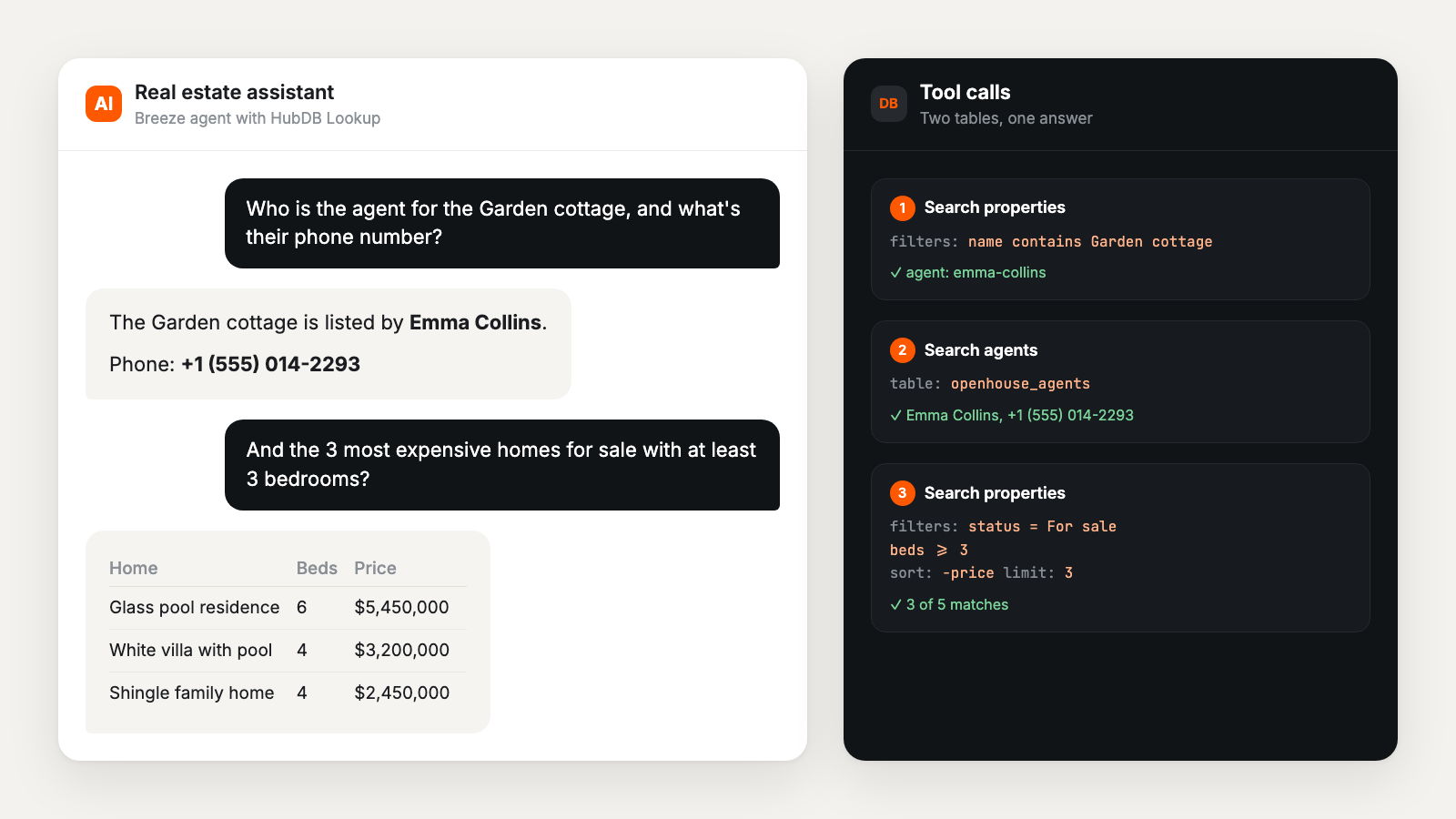
    Find a listing in one table and its agent in another. The agent chains searches to answer one question.

  • Read-only and private

    Only HubDB read access. No contacts, no deals, no copies of your table data.

  • Workflows too

    Both tools are workflow actions. Use matching rows in emails, property updates or branches.

  • Readable results

    Select labels, yes/no, dates and image links come back as plain text the agent can quote.

How it works

Running in three steps.

  • Install the app

    Click Install free, choose your HubSpot account and approve read access to HubDB.

  • Add the two tools

    In your Breeze agent, add List HubDB tables and Search HubDB table.

  • Ask a question

    The agent finds the right table, filters it and answers from your rows.

At a glance

What it needs, and what it can see.

Details

Type
HubSpot app with 2 Breeze agent tools
Tools
List HubDB tables, Search HubDB table
Works with
Content Hub Professional or Enterprise (HubDB)
Access
Read HubDB tables and rows only
Results
Up to 50 rows per search
Support
Email, plus a free setup call during early access

What early users get

  • Free use during early access
  • A setup call: we connect it to your tables and test your agent with you
  • Help naming tables and columns so agents find them
  • A direct line to the developer for feedback and fixes
  • Step-by-step documentation

FAQ

Before you install.

Want help setting it up?

Book a free call. We connect it, check your tables and test your agent with you.

Book a setup call (opens in a new tab)
What do I need?

A HubSpot account with HubDB (Content Hub Professional or Enterprise), Breeze agents, and at least one published HubDB table.

Install says my account "lacks access to the required scopes". Why?

The account doesn't have HubDB, or your user can't grant access to it. HubDB comes with Content Hub Professional or Enterprise. Check that Content > HubDB opens in the account. If it does, ask a Super Admin to install the app. Still stuck? Book a setup call.

Can it change my tables or see my contacts?

No. It only has read access to HubDB tables and rows. It can't edit HubDB and can't see contacts, deals or any other HubSpot data.

Does it store my data?

No copies of your table data. It stores only the access keys HubSpot issues when you install it. See the privacy policy.

Do I have to set up each table?

No. The agent sees your published tables and their columns, and picks the right one. Clear table and column names help.

How does it work under the hood?

HubSpot sends each tool call to a small, signed endpoint that reads HubDB with your account's access and returns the rows as text. We wrote up the details, and what we learned, in How we built a Breeze agent tool that answers from HubDB.

Is it really free?

Yes, during early access. If we add paid plans later, early users hear about it first and the price will be on this page before it applies.

Is it on the HubSpot Marketplace?

Not yet. It's in early access while we work with the first users. Install it with the button on this page.

How do I remove it?

In HubSpot, go to Settings, Integrations, Connected apps, open HubDB Lookup and uninstall. Its stored access is deleted within a day.

Early access

Give your agents your HubDB data today.

Install it free, add the two tools to an agent and ask it a question about your tables. Stuck? We'll set it up with you.

Free during early access · Read-only · Uninstall anytime